Key takeaways
- Historically, Campaign Manager 360's Path to Conversion report visualized the full cross-channel customer journey, but fragmentation and privacy changes have shifted how marketers reconstruct it.
- Formats like CTV, YouTube, and streaming audio are playing a larger role in the customer journey, and their contribution is undervalued in traditional last-click attribution, creating a measurement disconnect.
- Google introduced a new measurement framework, GEM (Google Ecosystem Measurement), and is working to strengthen Campaign Manager 360's path to conversion reporting and assisted conversion visibility.
- Adswerve's proprietary pathing tool works with Campaign Manager 360 data to offer the structured, visual reporting marketers need to prove success.
Understanding how your customers interact with your brand across channels before they convert is a critical part of a solid marketing strategy. For years, path to conversion reporting in tools like Campaign Manager 360 (CM360) provided the information in an easy-to-digest format. But with tighter privacy regulations, increasingly fragmented media, and changing measurement approaches, what was once a simple report pull has become more complex.
Let's look at what's changed in path to conversion reporting, how Google is responding, and how to get full cross-channel visibility today.
The original promise of cross-channel measurement
Campaign Manager 360 was built on a simple, powerful premise: providing a neutral, cross-channel view of a brand’s media. Instead of forcing marketers to piece together fragmented platform reports where every walled garden claimed full credit for the same conversion, it offered a single view of how channels actually collaborated across the customer journey.
As media mixes expanded to include programmatic, paid social, online video, mobile apps, and connected TV (CTV), this centralized view became essential. The platform's Path to Conversion report allowed marketers to visually map touchpoint sequences, identify which channels opened the funnel versus those that closed it, and gauge exactly how much exposure was required before a user converted. While it had its limitations, it was an accessible and highly useful tool for navigating a complex digital ecosystem, especially with the rise of CTV, YouTube, and streaming audio.
Historically, these channels were treated as strictly top-of-funnel, impression-led environments designed for awareness rather than immediate action. Even now, as platforms introduce more interactive features, such as the shoppable formats and QR codes highlighted at Google Marketing Live, these video and audio environments still face significant hurdles when evaluated by traditional measurement frameworks like last-click attribution models.
Uncovering the value last-click can't see
When marketers push brands to invest in these highly influential channels, legacy last-click reporting models often fall short. If an ad doesn’t drive an immediate, direct click, standard reports tend to treat the spend as a poor investment. The outdated framework fails to recognize these formats as critical conversion drivers, creating a disconnect between where the industry is heading and how marketers evaluate success.
Without path data, everything that led to a search click disappears from the performance story. If someone sees a CTV ad, never clicks, and searches for the brand three days later, that exposure gets zero credit under traditional reporting, even if it's what prompted them in the first place. Path to conversion reporting was one of the few frameworks that could actually reconstruct that sequence and make the full journey visible.
Pathing vs. attribution
It's worth distinguishing what made path to conversion reporting so valuable. Attribution models, including today's data-driven attribution, primarily feed bidding engines and optimize ad performance. They do that job well, but they were designed to give an aggregate view, not to dive into journey details.
Pathing is different. It's a chronological record of what actually happened: which channels were involved, in what order, and how many times before someone converted. That sequence is what helps marketers understand audience behavior, defend upper-funnel investment, and make smarter decisions about frequency and messaging. Campaign Manager 360's path to conversion report made that sequence visible and accessible. Then things got more complicated.
The rise of operational complexity (and costs)
As Google adapted to evolving privacy requirements, the native visual attribution interfaces inside Campaign Manager 360 changed significantly. The underlying data was still there, but the accessible, exploratory layer that made path to conversion reporting practical was no longer the primary way to work with it.
For many teams, this created a real operational shift. What had been a visual, interactive experience became a process built around large raw data exports. Reconstructing user sequences meant manually reading thousands of paths, managing massive pivot tables, and building custom data models.
During this time, conversion tracking itself had shifted, expanding beyond simple website pixels to include CRM events, phone calls, in-store retail transactions, and complex B2B pipelines. Connecting digital exposure to those offline outcomes required even more stitching together from multiple data sources, adding to an already demanding workflow.
Google introduces GEM
The good news is that Campaign Manager 360 has the underlying data marketers need. Google has been working to make it more accessible, strengthening path to conversion reporting, and improving assisted conversion visibility within the tool. They recently announced a new measurement framework, GEM (Google Ecosystem Measurement), alongside new and upcoming platform updates, to help.
With this move, Google is showing that while algorithmic modeling excels at optimization, human marketers still need visibility. Google is working to ensure Campaign Manager 360 is the enterprise measurement backbone to provide it.
GEM helps connect the underlying infrastructure and tracking mechanisms within the Google network, but there’s still a gap in translating raw, technical path records into clear, visual stories for stakeholders.
Closing the usability gap and activating the journey
To fill the gap, we built a proprietary pathing tool that gives our clients the visual layer that Campaign Manager 360 once offered and more.
We use our pathing tool to ingest standard Campaign Manager 360 path-to-conversion exports and transform them into structured, visual reporting, with no SQL, backend infrastructure, or cloud database setup required. We upload the file, and our tool cleans and normalizes thousands of fragmented interaction rows in under 60 seconds.
By using automated placement name resolution across campaigns, placements, and sites, such as tracking designated tags for PMax, YouTube, The Trade Desk, and CTV, the tool maps out true multi-channel performance. We use it to surface insights, including how awareness formats like CTV are influencing search behavior, which channel sequences drive the highest-value conversions, which tactics build intent versus capture it, and where standard attribution models may undervalue entire channels. A Gemini-powered summary layer translates the findings into a plain-language narrative with recommendations covering frequency, saturation, and journey efficiency.
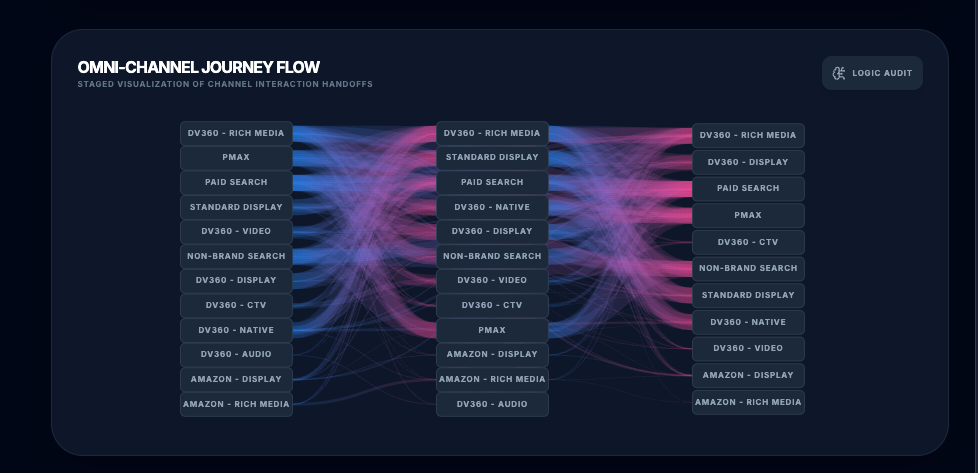
Adswerve’s pathing tool in action
One of our agency clients asked for our help justifying their media mix to a skeptical stakeholder who saw upper-funnel video and display costs as overhead rather than revenue drivers. Using our pathing tool, we showed exactly where their awareness channels were appearing in the journey before high-value conversions, giving a clear, sequenced picture of their contribution that last-click reporting had made invisible. Their conversation shifted from "why are we spending on this?" to "how do we scale it?"
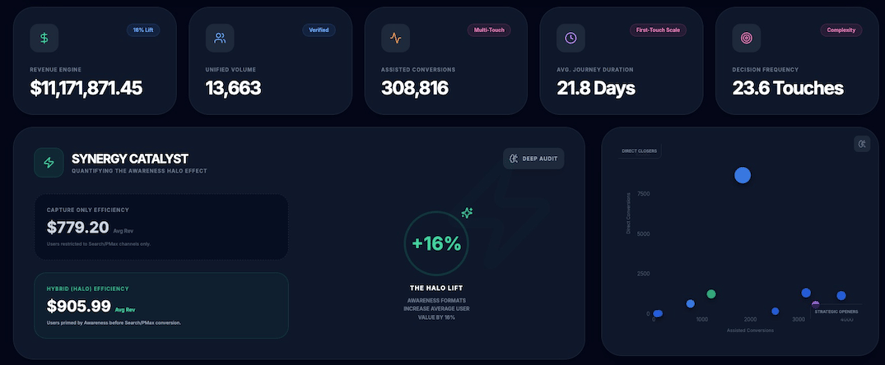
We've also used our pathing tool to surface waste. One client had a path with more than 100 interactions before a single conversion, a sign they were overserving ads and overspending. Seeing that pattern clearly laid out, we helped them adjust their frequency caps and improve overall media ROI.
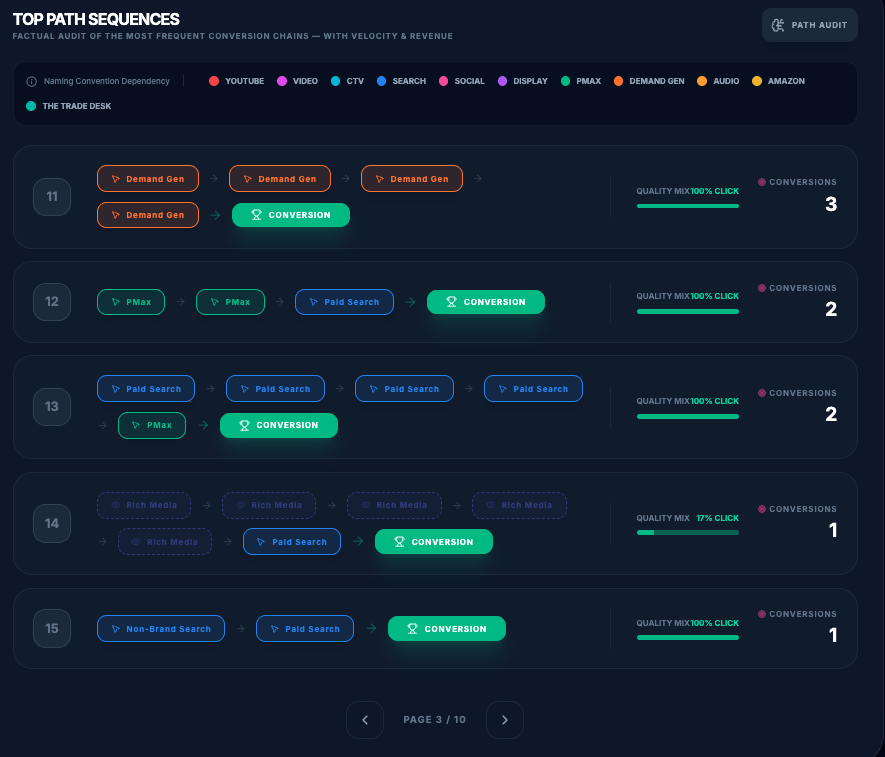
These are the kinds of conversations that path to conversion reporting was always supposed to enable. Now it can again.
Your path starts here
For the last several years, the gap between available data and usable insight made path to conversion reporting more aspirational than practical. But now, with Google's continued investment in Campaign Manager 360 and our proprietary pathing tool, marketers can finally see and share the full conversion story, proving the value of their media programs.
Want to learn more about how we can use our pathing tool to help you? Reach out, and we’ll be in touch.

eBook | Connected TV: From reach to measurable performance
A guide to measuring, protecting, and scaling your connected TV (CTV) investment, from inventory dilution to a five-stage CTV measurement framework.