Have you ever tried using GTM's built-in scroll tracking to unlock rich insights about people navigating your site, only to find that it doesn't work in all cases and therefore you can't trust the data? We hate when that happens, too. That's why we created this solution.
A while back, a client discovered that their scroll depth tracking solution wasn't working properly when viewing the website with a mobile device. Their numbers didn't line up in GA when segmenting by device type.
Their implementation was using the built-in GTM scroll depth tracking trigger and variables. When using the Chrome device preview mode and the Adswerve dataLayer Inspector+, we found all scroll depth percentages fired immediately, despite the page being long enough that even 25% should not have been firing yet.
To help combat this issue, we developed our own mobile-ready, scroll tracking JS snippet for GTM. Version 1 of our script proved useful, separating out how scrolling worked between device types. However, we then discovered that "fast scrolling" (using a finger to swipe up fast and hard) prevented the script from accurately representing the scroll depth.
We have since cleaned up the code, added in easily accessible options to modify the percentiles tracked (including 0% if wanted) and the refresh rate (threshold).
Take a look! We hope it solves your scroll tracking roadblock!
First and Foremost
What This Code Does Not Do
- Infinite content and Single Page Application (SPA)-type pages aren't well-suited for percentile-based tracking (representing 50% of infinity is for bored college math majors, not for actionable digital marketing data).
- In the future, we may release a version of this code to handle these types of pages.
What This Code Does Do
- The snippet below is a modifiable general-purpose scroll-tracking snippet ideal for most web and mobile sites. This specific solution was designed around a recurring need to handle sites that somehow managed to break GTM's built-in scroll-tracking trigger
What you'll Need
- A website with GTM installed
- A basic understanding of custom event triggers and dataLayer variables
- The code snippet provided below
Code Snippet
Download file here: Adswerve Version 1.1.2 Scroll Tracking (.txt)
Instructions
1. Create a New Workspace
2. Create Custom HTML Tag
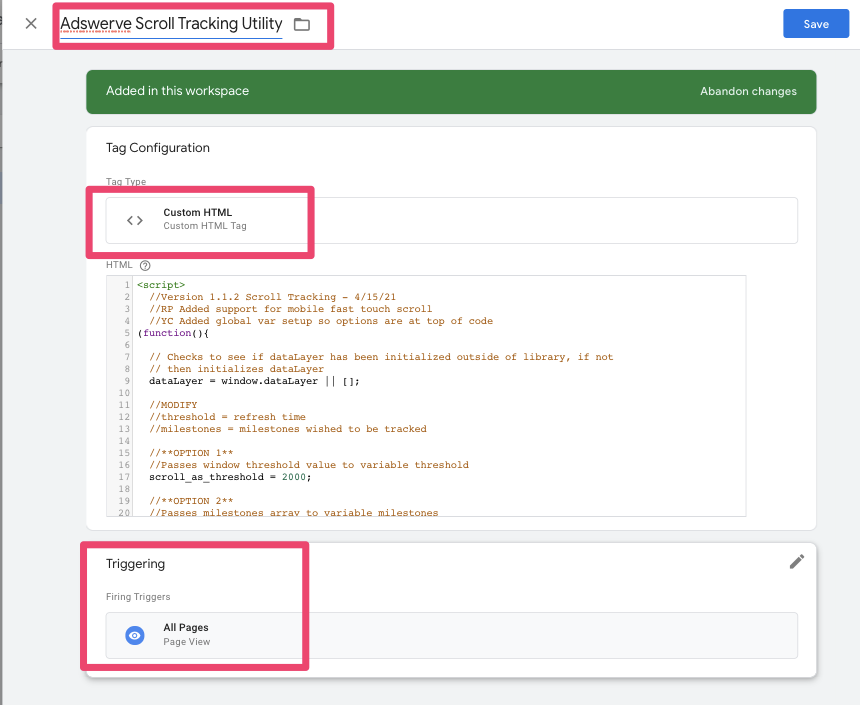
a. Go to Tags
b. Create New -> Custom HTML
c. Paste in the snippet
d. Trigger on All Pages
e. Name it Adswerve Scroll Tracking Utility
f. Save
3. Create dataLayer variable
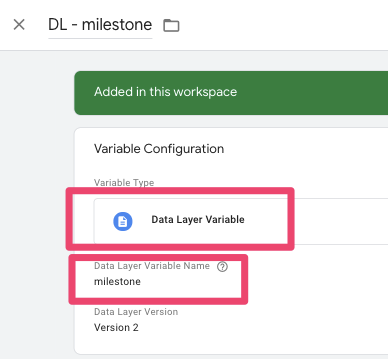
a. The snippet pushes a dataLayer variable named milestone, which is the % being tracked
b. Go to Variables
c. New Variable -> Data Layer variable
d. Name DL - milestone
e. Enter milestone in empty field
f. Version 2 (default)
g. Save
4. Create custom event trigger
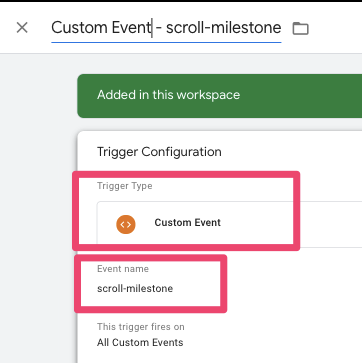
a. The snippet pushes a event to the dataLayer called scroll-milestone which will serve as the trigger for the GA event tag
b. Go to Triggers
c. New Trigger -> Custom Event
d. Name is Custom Event - scroll-milestone
e. Save
Create the GA event tag
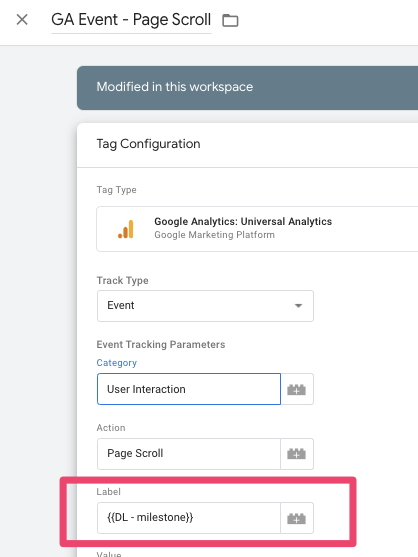
a. Create the GA event tag as appropriate to the event data model you currently use, but make sure to insert the new dataLayer milestone variable where you would like the percentiles to show.
The variable will show up as a percent, so in the example above it will show as "25%" or "50%"
b. Trigger the tag on the new custom event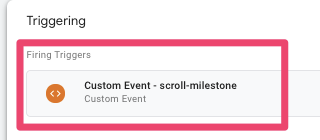
Options:
The tracking code has the benefit of having three modifiable options near the top of the code:
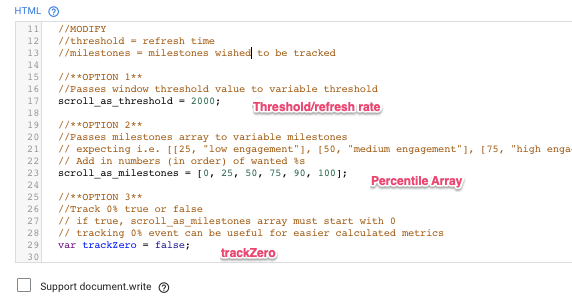
- 1) Threshold/Refresh Rate
- This is time, in milliseconds (2000 = 2 seconds), to make sure the requests don't come in too quickly. A lower rate triggers the tracking more frequently
- 2) Percentile Array
- These are the % scroll numbers we want to track
- By default, the code tracks 25, 50, 75, 90, and 100%
- Keep the beginning of the array at 0 to minimize potential bugs
- 3) trackZero
- If you wish to track a 0% scroll (triggers upon first scroll), switch this to true
And there you have it, a better scroll-tracking solution for when the built-in one doesn’t hit the mark.
Questions about the snippet (or anything else)? Please contact us today!