Your Adobe Real-Time Customer Data Platform (RT-CDP) environment starts generating data volume from the moment you go live. Web interactions, device signals, and behavioral events flow into the platform continuously. But without the right retention settings in place, that data can accumulate fast.
Getting your time to live (TTL) and data retention configurations right early is one of the most impactful steps you can take to keep your platform performing well, your audiences accurate, and your license usage aligned with your actual activation needs. Here's what we recommend based on what we see across our client implementations.
What does TTL control in Adobe Real-Time CDP?
TTL determines how long event data remains available in your Adobe Experience Platform (AEP) environment. Within Real-Time CDP, there are two primary storage areas that are affected by data retention: the profile store and the data lake.
The profile store holds the data that powers your audience segmentation and activation. When you build a segment in Real-Time CDP, the platform queries profile store data to determine which users qualify. The longer your retention window is, the more data the platform has to process for every segmentation job, which directly affects processing time and platform performance.
Meanwhile, the data lake stores the broader set of raw event data that feeds analytics tools like Adobe Customer Journey Analytics (CJA). Data lake retention operates independently from profile store retention, which means you can keep a longer history for reporting and trend analysis without that data affecting your Real-Time CDP segmentation performance.
Retention is managed at the dataset level, so each dataset in your environment can have its own TTL configuration. That flexibility is important because not every dataset has the same shelf life. A web clickstream dataset and a CRM import dataset serve different purposes and their data stays relevant for different lengths of time.
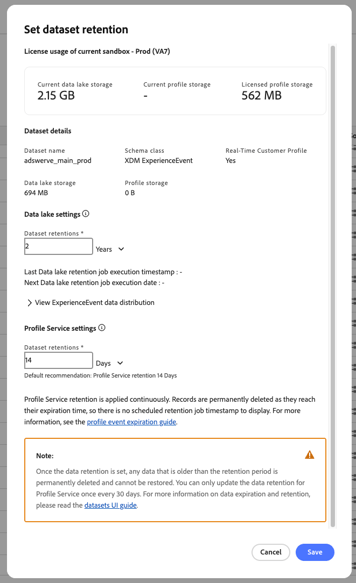
Data lake and Profile Service retention are set separately for each ExperienceEvent dataset.
Why data retention should be an RT-CDP pre-launch priority
One of the most common patterns we see across client implementations is teams deferring retention configuration until after their initial launch. But as we mentioned earlier, data accumulates quickly once ingestion is live. A single web activity dataset can grow substantially within weeks depending on your traffic volume and the number of events you’re capturing. By the time a team circles back to configure retention, the data volumes and associated license metrics may already be well beyond what was originally anticipated.
That’s why we recommend making retention configuration part of your pre-launch checklist, alongside schema design and identity resolution. Specifically, before going live, teams should familiarize themselves with the license usage dashboard in Adobe Experience Platform, which tracks total data volume and addressable audiences against your contract entitlements. Understanding what those metrics mean and how your data contributes to them gives you the visibility to make informed retention decisions from the start rather than reacting later.
It also pays to get these settings right the first time. Once a retention period is applied, any data older than that window is permanently deleted and can’t be restored, and Profile Service retention can only be changed once every 30 days. Choosing a deliberate value before launch is much easier than correcting course after production data is already flowing.
Your Adobe customer success team and your implementation partner are both good resources for aligning retention settings with your contract before you start ingesting production data.
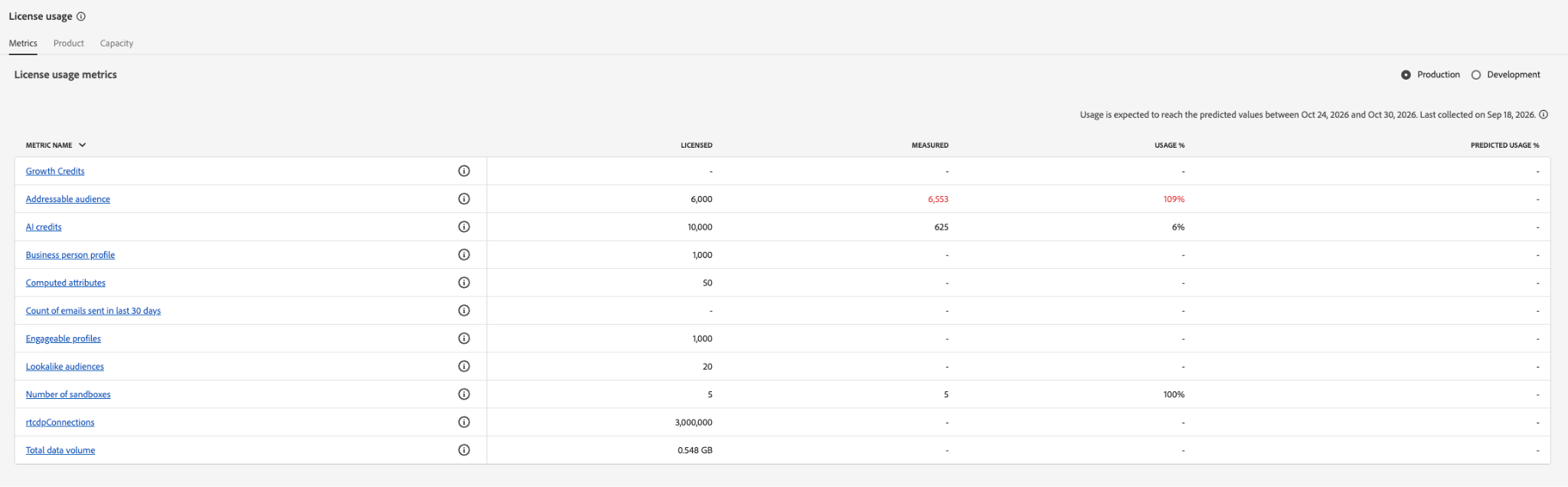
The license usage dashboard tracks metrics like addressable audience and total data volume against your contract entitlements.
How pseudonymous and authenticated profiles affect your RT-CDP retention strategy
Not all profiles in your Real-Time CDP environment carry the same value for activation. The distinction between pseudonymous and authenticated profiles has a direct impact on how you should think about retention.
A pseudonymous profile is one that only has a device cookie (like an Experience Cloud ID) without a more durable authenticated identity attached. When someone visits your site without logging in or creating an account, the platform creates a profile based on that device cookie alone. There’s no email address or account identifier to tie that behavior to a known individual.
Authenticated profiles, on the other hand, have a durable identity in the graph. When a user logs in, their device activity gets stitched to a richer profile that includes attributes like demographic data, purchase history, and cross-device behavior. Those profiles are significantly more valuable for activation because you can layer behavioral context on top of identity context to build more precise audience segments.
Pseudonymous profiles accumulate quickly, and the device cookies they’re tied to have a limited lifespan. Retaining pseudonymous data for extended periods means your addressable audience counts include profiles tied to cookies that may no longer correspond to a reachable user, which inflates your numbers without improving your targeting.
We recommend configuring your pseudonymous profile expiration setting to remove those profiles from your audience pool after a shorter retention period. Unlike dataset retention, this is set once per sandbox, and you choose which identity namespaces (such as ECID or mobile advertising IDs) define a profile as pseudonymous. This keeps your addressable audience focused on users you can meaningfully reach and keeps your identity architecture clean.
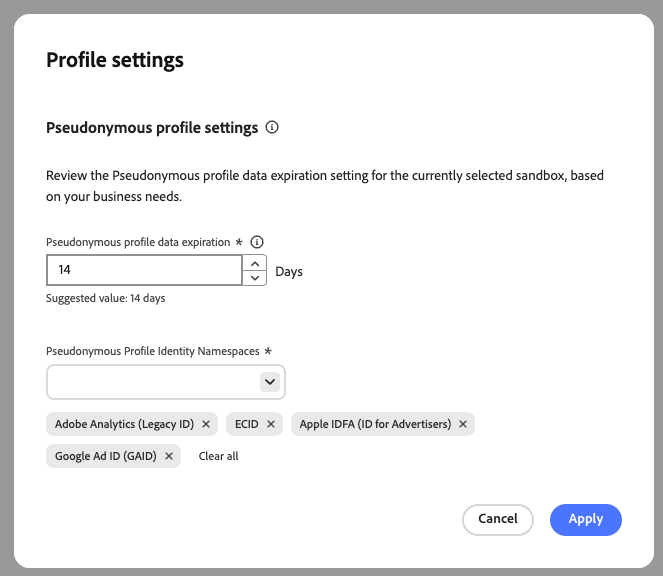
Pseudonymous profile expiration applies across the sandbox to profiles identified only by the namespaces you select.
How to choose the right retention window for your activation goals
There’s no one-size-fits-all retention window. The right period depends on how long behavioral data remains relevant to your segmentation and activation use cases. For commerce teams with fast conversion cycles, a shorter retention window often makes sense. If a user was browsing for shoes two weeks ago and hasn’t returned, they’ve probably already bought a pair somewhere else. Retaining that behavioral data for 90 days means the platform is processing and storing information that’s unlikely to improve your campaign outcomes.
For most use cases, we recommend starting with the 14-day baseline and working up from there based on analysis rather than defaulting to a longer window. If your organization has a longer consideration cycle (like high-value purchases, financial products, or B2B sales), though, you may want to consider anchoring your TTL to your average time to conversion.
The most reliable way to size your retention is to analyze your Web SDK data. Look at conversion patterns, return visit behavior, and the point at which behavioral signals lose their predictive value. Your analytics team can run this analysis in Customer Journey Analytics to determine where the drop-off occurs for your specific traffic.
If you do need to retain certain long-tail audience data without overloading profile storage, Adobe’s Query Service offers an alternative. You can query event data that doesn’t need to live in profiles, aggregate it into compact derived attributes for activation, and keep your profile store focused on high-frequency use cases.
How data retention differs between RT-CDP and CJA
One thing we like to point out to clients (especially those who have used Customer Journey Analytics for a long time but are newer to Real-Time CDP) is that Real-Time CDP and Customer Journey Analytics handle retention for the same web data independently. A single dataset can be both profile-enabled (used for Real-Time CDP segmentation) and used as a source for Customer Journey Analytics reporting.
But the retention settings are separate for each. Real-Time CDP retention is about keeping activation data current, while Customer Journey Analytics retention is about preserving enough history for meaningful analysis.
So your web activity data might have a 14-day retention window in the profile store for activation purposes, while Customer Journey Analytics manages its own retention period at the connection level, often a year or more to support year-over-year analysis and trend reporting in Customer Journey Analytics.
The key takeaway is that tightening your Real-Time CDP retention window doesn't mean losing access to that data for analytics and reporting purposes. The two systems are designed to work in tandem with different retention strategies, and getting comfortable with that distinction gives you more flexibility to optimize each independently.
How Adswerve can help
Getting retention right from the start is one of the highest-impact steps teams can take when implementing or optimizing Adobe Real-Time CDP. Adswerve works with enterprise teams on Real-Time CDP implementation and ongoing platform optimization, including retention strategy, license alignment, and data governance. If you’re planning an Adobe Real-Time CDP launch or looking to optimize an existing environment, we'd love to talk.